


EcoCash Twitter Account Hack: A Digital Wake-Up Call for Zimbabwe’s Mobile Money?
The recent compromise of EcoCash’s official X (formerly Twitter) account has sent ripples across Zimbabwe’s digital landscape, igniting critical questions about cybersecurity within the nation’s dominant mobile money platform. The incident, which saw a hacker claiming an unreimbursed US$35 loss, briefly transformed a corporate communication channel into a platform for grievance and digital chaos, posting unauthorised and explicit content. While EcoCash swiftly regained control, asserting that its financial systems remained secure, the episode has sparked a fervent public debate: was this merely an isolated act of digital vandalism, or does it expose deeper vulnerabilities within Zimbabwe’s increasingly digitised financial ecosystem? This investigation delves into the implications of such a breach, exploring how easily public trust can be eroded and the potential for more sophisticated attacks. It examines the fine line between social media security and the integrity of financial transactions, questioning whether current safeguards are robust enough to protect millions of users. This incident serves as a stark reminder that in an era of rapid digital transformation, the perception of security is as crucial as its reality, and any crack in the digital armour can have far-reaching consequences for both companies and consumers.
The Breach Unfolds: A Hacker’s Grievance and Digital Chaos
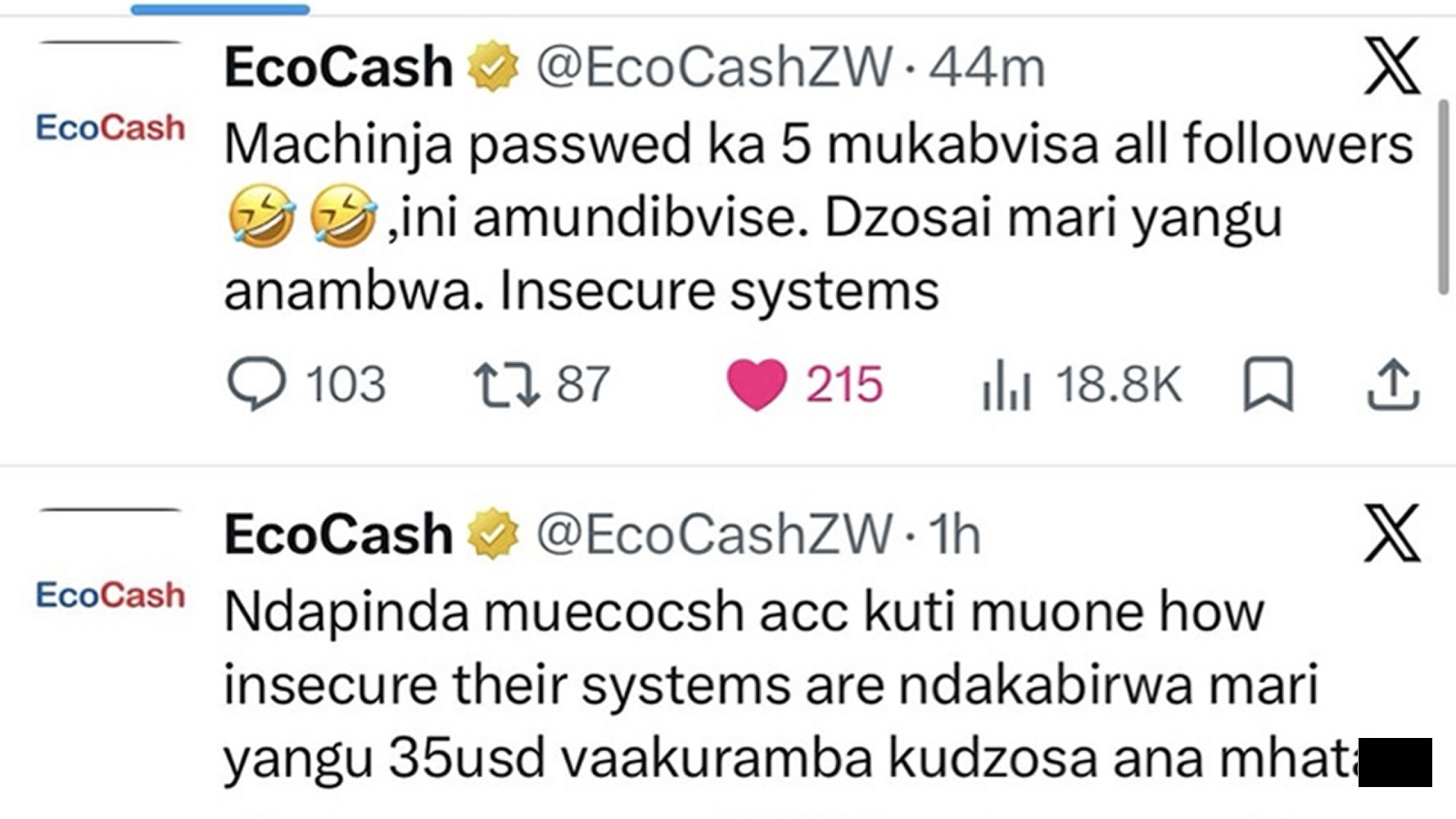
The digital intrusion occurred on a Wednesday, with the hacker taking control of EcoCash’s X account for over two hours. During this period, the account, typically a hub for customer service and corporate announcements, became a conduit for profanities and explicit material. The attacker, driven by a purported US$35 loss that EcoCash allegedly refused to reimburse, changed the account’s profile picture to a pornographic image and renamed it with a profanity-laden statement demanding their money back. “I hacked the EcoCash account so that you see how insecure their systems are. I had my money stolen, $35. They are refusing to return it these ****,” the hacker declared in one post.
Amidst the explicit content, the hacker engaged directly with bewildered customers who had tagged the account seeking clarification. When one user, Guxungo, posted, “someone has taken over the @EcoCash account,” the hacker responded with an expletive, further highlighting the brazen nature of the attack. The perpetrator even taunted EcoCash’s attempts to recover the account, writing, “You’ve changed the password five times and removed all followers😂😂. You can’t remove me. Return my money you dogs. Insecure systems”. While the hacker’s claims of a stolen US$35 could not be independently verified, complaints about missing mobile wallet funds are not uncommon on the platform, which routinely handles customer service queries via X.
EcoCash, a subsidiary of Econet, confirmed the compromise and stated that it was working with X to regain control, which it eventually did. The unauthorised posts and explicit content were subsequently removed. Crucially, the company assured its users that its financial systems remained secure and were not affected by the social media breach. However, the silence from EcoCash and its parent company, Econet, for nearly 20 hours after regaining control, only amplified public concern and left many questions unanswered.
Beyond the X Account: Broader Implications for Digital Trust
This incident, while seemingly confined to a social media platform, has sparked a wider conversation amongst Zimbabwean citizens and cybersecurity experts. Many are asking if this breach is a symptom of a larger problem, particularly given the increasing reliance on mobile money for daily transactions in the country. EcoCash, launched in 2011, now serves approximately 90% of Zimbabwe’s adult population, offering an extensive suite of payment and banking-related services. This pervasive reach means that any perceived vulnerability, even in a peripheral system like a social media account, can have significant repercussions for public confidence in the entire digital financial ecosystem.
The hacker’s motivation, stemming from an alleged unreimbursed loss, underscores a potential deficit in customer service and dispute resolution mechanisms. It suggests that individuals might resort to extreme measures when conventional avenues for redress prove frustrating or ineffective. This raises concerns about the robustness of customer support systems and whether they adequately address user grievances, thereby preventing such retaliatory actions. Furthermore, the nature of the content posted during the hack – explicit material – highlights the potential for severe reputational damage and the urgent need for stringent social media management protocols within corporate entities.
The incident also provided an opportunity for EcoCash’s main rival, OneMoney, to subtly highlight security concerns. OneMoney posted a dig on its own X account, alongside a security advisory urging customers not to share PINs or use predictable numbers. “We told them ‘1234’ isn’t a password… but they didn’t listen,” read the post, a clear reference to the EcoCash incident. This competitive jab further underscores the heightened awareness and sensitivity surrounding cybersecurity in the mobile money sector.
A Pattern of Vulnerability: Cybercrime in Zimbabwe’s Digital Landscape
The EcoCash X account hack is not an isolated event but rather fits into a broader pattern of cybercrime and digital security challenges facing Zimbabwe. In 2018, Zimbabwean police handled over 4,000 cases of cybercrime, with the country reportedly losing US$40 million to such activities in the same year. More recently, in February 2026, a major operation across Africa targeting online scams resulted in 651 arrests and the recovery of US$4.3 million, indicating the scale of the problem regionally.
Specific to EcoCash, there have been past incidents that point to ongoing vulnerabilities. For instance, reports indicate that 11 EcoCash hackers were brought to court after allegedly stealing over US$61,000 from unsuspecting clients. This suggests that while the recent X account hack was a social media compromise, the underlying financial platform has also been a target for more direct forms of theft. These incidents collectively paint a picture of a digital financial landscape under constant threat, where both sophisticated and opportunistic attackers seek to exploit weaknesses.
Zimbabwean authorities are not unaware of these growing threats. In April 2026, it was reported that Zimbabwe was expanding its digital security framework amidst growing online threats. The Minister noted that cyber fraud has become a significant national and continental challenge, with mobile money fraud being a particular concern in Zimbabwe. This acknowledgement from high-level officials indicates a recognition of the problem and an intent to bolster national cybersecurity measures.
Regulatory Framework and the Path Forward
The Reserve Bank of Zimbabwe (RBZ) has been active in regulating the mobile money sector. The Banking (Money Transmission, Mobile Banking and Mobile Money Interoperability) Regulations, 2020, and subsequent amendments like SI 17 of 2025, aim to govern financial companies, fintechs, and money transmission service providers. These regulations cover aspects such as interoperability and aim to create a more secure and stable mobile money environment. However, the continuous evolution of cyber threats necessitates a dynamic regulatory response that can adapt quickly to new challenges.
The EcoCash incident serves as a critical test case for the effectiveness of these regulations and the broader cybersecurity infrastructure in Zimbabwe.
For companies like EcoCash, rebuilding and maintaining public confidence is paramount. This involves not only strengthening technical safeguards but also enhancing customer service and dispute resolution mechanisms. If users feel their grievances are not adequately addressed through official channels, the risk of individuals resorting to unconventional or even malicious means to seek redress increases. Transparency in communication following a breach, even a social media one, is also vital. The initial delay in EcoCash’s public statement after regaining control of its X account may have inadvertently fuelled speculation and eroded trust further.
Moreover, the incident highlights the critical importance of robust social media management protocols. Corporate social media accounts are often the first point of contact for customers and a primary channel for public communication. As such, they require the same level of security scrutiny and management as other critical digital assets. This includes strong password policies, multi-factor authentication, regular security audits, and clear protocols for handling potential breaches.
The Human Element: A Critical Vulnerability
While technological defences are crucial, the human element often remains the weakest link in cybersecurity. The hacker’s alleged motivation—an unreimbursed US$35—points to a breakdown in customer relations that escalated into a security incident. This underscores the need for companies to invest not only in advanced security technologies but also in their customer service infrastructure. A frustrated customer, feeling unheard or wronged, can become a significant risk, whether intentionally or unintentionally, to a company’s digital security posture.
Furthermore, employee training on cybersecurity best practices is essential. Phishing attacks, social engineering, and weak password hygiene can all lead to account compromises. While the exact method of the EcoCash X account hack has not been disclosed, such incidents often stem from human error or vulnerability. Regular training and awareness campaigns can significantly reduce these risks.
A Wake-Up Call for All Stakeholders
The EcoCash X account hack is more than just a fleeting news story; it is a profound wake-up call for all stakeholders in Zimbabwe’s digital ecosystem. For mobile money operators, it necessitates a comprehensive review of their cybersecurity strategies, extending beyond core financial systems to all digital touchpoints, including social media. It demands an investment in robust customer service mechanisms that can effectively address user grievances and prevent escalation.
For regulators, the incident highlights the need for continuous evaluation and adaptation of the regulatory framework to keep pace with the rapidly evolving cyber threat landscape. This includes potentially introducing specific guidelines for social media security for financial institutions and ensuring that dispute resolution processes are efficient and transparent.
For the millions of mobile money users in Zimbabwe, the incident serves as a reminder of the importance of digital vigilance. While companies bear the primary responsibility for securing their platforms, users also have a role to play in protecting their personal information and being wary of suspicious online activity. The digital transformation of Zimbabwe’s economy offers immense opportunities, but it also brings with it new risks that require a collective and concerted effort to mitigate.
In conclusion, the EcoCash X account hack, initially appearing as an act of digital vandalism, has unveiled deeper systemic issues concerning cybersecurity, customer trust, and regulatory oversight in Zimbabwe’s burgeoning mobile money sector. It underscores the imperative for a holistic approach to digital security, one that integrates advanced technology with robust human processes and responsive regulatory frameworks. Only through such a comprehensive strategy can Zimbabwe truly safeguard its digital future and ensure the continued confidence of its citizens in the digital realm.